Zloth

Alternative comparison

NoteGPT alternative

If NoteGPT feels broader than what you need, Zloth is a focused YouTube summarizer Chrome extension built around one click from the YouTube feed.

Key Takeaways

  • Zloth is a focused NoteGPT alternative for Chrome users who want fewer steps.
  • The main difference is the starting point: Zloth starts on the YouTube thumbnail, not in a separate link-paste workflow.
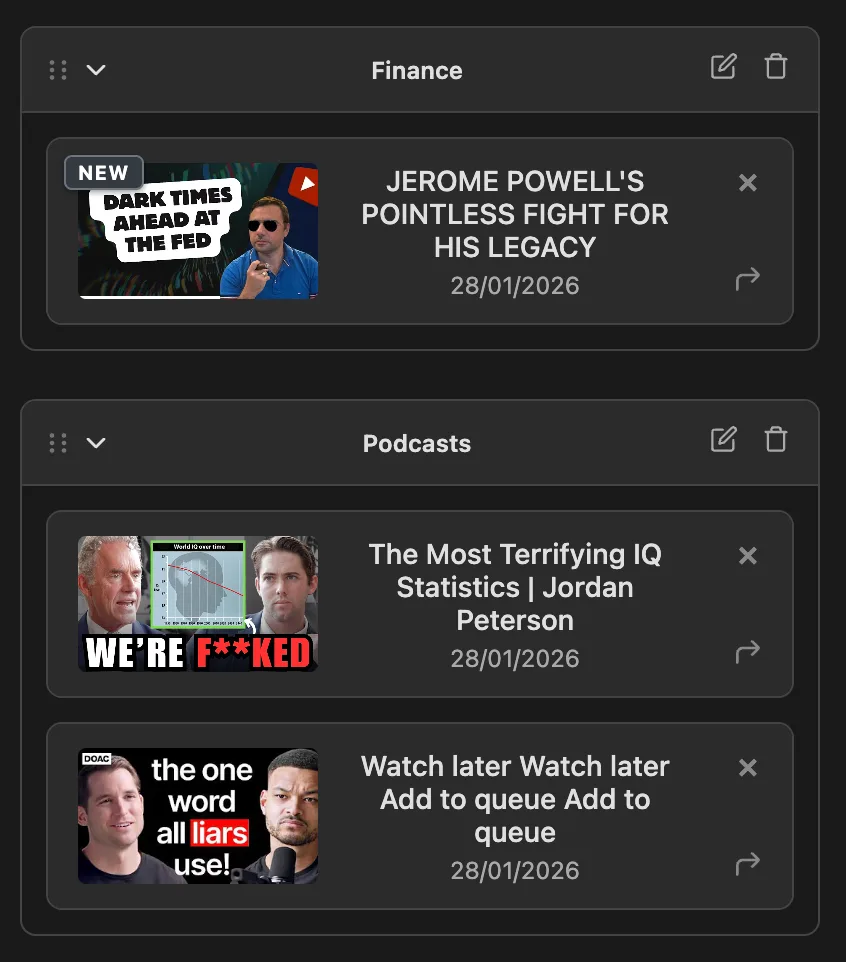
  • Zloth saves summaries into folders, so useful videos become a reusable library instead of throwaway AI output.
  • NoteGPT can still be the better pick if you want students and researchers who want a broad online ai learning suite with batch video, playlist, document, image, audio, and slide tools.

First-party comparison proof

How we compared these YouTube summarizers

Last updated: June 14, 2026

  • We compared Zloth, Eightify, Glasp, and NoteGPT using public product pages, pricing pages, and Chrome Web Store listings where available.
  • We focused on YouTube-summary workflow, free tier, pricing, clickable timestamps, custom prompts, saved-summary organization, and whether users can avoid copy-pasting links.
  • Competitor claims are limited to facts visible on public pages checked on June 14, 2026. Pricing and feature limits can change.
  • Zloth claims are first-party product claims based on the current Chrome extension: thumbnail summaries, Summary and Analysis modes, Pro custom prompts, saved folders, sync, and text-to-speech.
Source Checked Used for
Eightify website June 14, 2026 Feature claims, positioning, platform coverage
Eightify Chrome Web Store listing June 14, 2026 Free trial, Chrome extension claims, feature list
Glasp YouTube summarizer page June 14, 2026 YouTube summary features, model/prompt claims
Glasp pricing June 14, 2026 Free and paid plan limits
NoteGPT YouTube summarizer page June 14, 2026 YouTube summary features, batch/playlist claims
NoteGPT pricing June 14, 2026 Paid plan pricing and quota claims

A free alternative to NoteGPT

Zloth is the lighter NoteGPT alternative when the important workflow is one-click YouTube browsing, saved summaries, folders, and no link-copying loop.

  • Zloth: summarize from thumbnails, avoid tab switching, save summaries into folders, sync across devices.
  • NoteGPT: Students and researchers who want a broad online AI learning suite with batch video, playlist, document, image, audio, and slide tools.
When NoteGPT is the better pick

NoteGPT is a good pick if you want to paste many links at once, process playlists, or use a wider bundle of AI learning tools outside YouTube.

Public pricing note: Pricing page lists Pro at $9/month, Unlimited at $19.92/month on annual billing, and Max at $69/month on annual billing.

YouTube summarizer comparison table

A practical feature comparison focused on workflow, free tier, organization, and pricing.

Competitor facts checked against public pages in June 2026.

Criteria Zloth NoteGPT
Best fit YouTube-first Chrome users who want summaries before opening videos. Students who want batch processing and an all-in-one AI study suite.
Summarize from thumbnail Yes. Zloth adds a Summarize button directly to YouTube thumbnails and watch pages. Primarily promoted as paste/add-link online summarization and batch processing.
No copy-pasting links Yes. The core workflow happens inside YouTube. No for the main web workflow; users paste or add video links.
Clickable timestamps Yes in Summary mode. Yes. Timestamped video notes are part of its learning workflow.
Custom prompts Yes on Pro. Yes. Custom prompt and summary length are promoted publicly.
Saved and organized library Yes. Summaries save to a personal library with folders and sync. Yes, through NoteGPT notes, but the YouTube page emphasizes generated online summaries.
Text-to-speech Yes. Built-in TTS, with Pro AI TTS minutes. Voice tools exist in the broader product suite.
Free tier Free to start with 120 summary credits per month. Free online summarizer is promoted; paid plans add quotas and processing power.
Entry paid price $5.99/month or $49.80/year for Pro. $9/month for Pro.
Chrome-only focus Yes. Focused on Chrome and YouTube. No. Broad web app and AI learning suite.
When Zloth is the better pick When you want the fastest in-flow decision: summarize from the feed, save it, organize it, and move on. Choose Zloth over NoteGPT if you want less copy/paste and fewer all-in-one app surfaces.

Screenshots and media

See the Zloth workflow

These are first-party product captures: thumbnail summaries, timestamp output, and the saved summary library.

Summarize from the YouTube thumbnail

Zloth places the action before the click, so you can decide whether a video is worth opening.

Clickable timestamp summaries

Summary mode turns long videos into timestamped notes you can jump through.

Zloth folder library with saved YouTube summaries

Saved summary library

Useful summaries become a reusable library with folders and sync.

Actual review

Actual review: where Zloth wins

Zloth is best when the YouTube feed is the starting point. Its strongest advantage is not a longer feature list; it is reducing the steps between seeing a video and knowing whether it is worth your time.

Best for

  • Students screening lectures and tutorials before committing to a full watch.
  • Researchers and professionals who want timestamped notes without losing their browsing flow.
  • People who want summaries saved into folders instead of temporary AI chat output.

Not the best fit for

  • Users who need mobile apps more than a Chrome-first workflow.
  • Users who want a broad highlighting, PDF, or all-in-one AI study suite.
  • Teams that need batch processing of many links at once.

NoteGPT feature notes

NoteGPT promotes free online YouTube summarization, transcripts, batch summarization, playlists, custom prompt/length, and 40+ languages.
Its page emphasizes copy/paste link generation and batch workflows rather than an in-feed Chrome-first experience.
The paid Pro plan lists 1,000 basic quotas per month and supports processing up to 5 YouTube videos at once.

Un-copyable proof

Example first-party Zloth summary

A real Zloth-style summary of our own 20-second product demo transcript.

Zloth product demo

  • 00:00 - The problem: opening every YouTube video wastes time before you know whether it is worth watching.
  • 00:04 - Zloth adds the summary action directly to the YouTube thumbnail.
  • 00:08 - The extension can return timestamps, key takeaways, and custom-prompt answers.
  • 00:12 - Summaries are saved into folders and synced across devices.
  • 00:16 - The CTA is simple: add Zloth to Chrome and learn more while watching less.

Try Zloth free in Chrome

Use the next YouTube thumbnail as the test. If the summary answers the question, you can skip the video or save it for later.

Frequently Asked Questions

Is Zloth a free NoteGPT alternative?

Yes. Zloth is free to start and is a focused NoteGPT alternative for Chrome users who want to summarize YouTube videos from thumbnails and save results into folders. NoteGPT is a good pick if you want to paste many links at once, process playlists, or use a wider bundle of AI learning tools outside YouTube.

What does NoteGPT do well?

NoteGPT is a good pick if you want to paste many links at once, process playlists, or use a wider bundle of AI learning tools outside YouTube.

Does Zloth summarize YouTube videos without copying links?

Yes. Zloth adds a Summarize button directly to YouTube thumbnails and watch pages, so you can stay in YouTube instead of pasting links into another tab.

Is Zloth free?

Yes. Zloth is free to start with 120 monthly summary credits. Pro is $5.99/month or $49.80/year for heavier use.

Does Zloth save summaries?

Yes. Every summary is saved into your personal library, and you can organize summaries in folders and sync them across devices.